SSO ID Login on sso.rajasthan.gov.in
SSO ID Login (sso.rajasthan.gov.in login): Rajasthan SSO (Single Sign-On) is a government portal that facilitates citizens to avail various government services. This portal makes various services and schemes of the state government available on a single platform, thereby eliminating the need for citizens to login to multiple portals separately. Through SSO Portal you can access various government schemes, services and documents online.
Rajasthan SSO Portal @sso.rajasthan.gov.in : Overview
| Portal Name | SSO Rajasthan Portal |
| SSO Full Form | Single Sign-On Rajasthan |
| Purpose | Provide a single authentication platform for accessing various government services in Rajasthan |
| Beneficiaries | Citizens of Rajasthan, Govt Employees and Businesses |
| Services Offered | Employment, e-Mitra, Business Registration, Certificates, Bills & Payments and more |
| SSO Official Website | sso.rajasthan.gov.in |
| Managed By | Government of Rajasthan |
| Registration Required | Yes |
| Security Features | Two-factor authentication, SSL encryption |
| Helpline Number | 0141-5123717 |
| Email Support | helpdesk.sso@rajasthan.gov.in |
To avail the services of SSO Portal Rajasthan, you will have to do SSO Registration on SSO Portal. After SSO registration, you will have to login to Rajasthan SSO Portal (sso.rajasthan.gov.in login) through SSO ID and SSO Password. After logging in with SSO ID, you can avail all the services available on SSO Rajasthan Portal.
In this page you can see the benefits of SSO ID, services available on SSO portal, SSO ID Registration, SSO ID Login, SSO Password Forget and all the information related to Rajasthan SSO Portal.
Services available on SSO Portal Rajasthan
You will get the following SSO services on SSO portal-
- Business Registration
- Bhamashah Rojgar Srijan Yojana (BRSY)
- Bhamashah Swasthya Bima Yojana (BSBY)
- Bhamshah Card
- Arms License
- Attendance MIS
- Employment opportunities
- Bank Correspondence
- Change of usage of land
- e-Devasthan
- e-Mitra
- e-Mitra Reports
- e-Learning
- SSO Rajasthan epass
- IFMS-RajSSP
- BPAS -Building plan approval system
SSO ID Registration Process On SSO Portal Rajasthan
To register on Rajasthan SSO (Single Sign-On) Portal, follow the following steps:
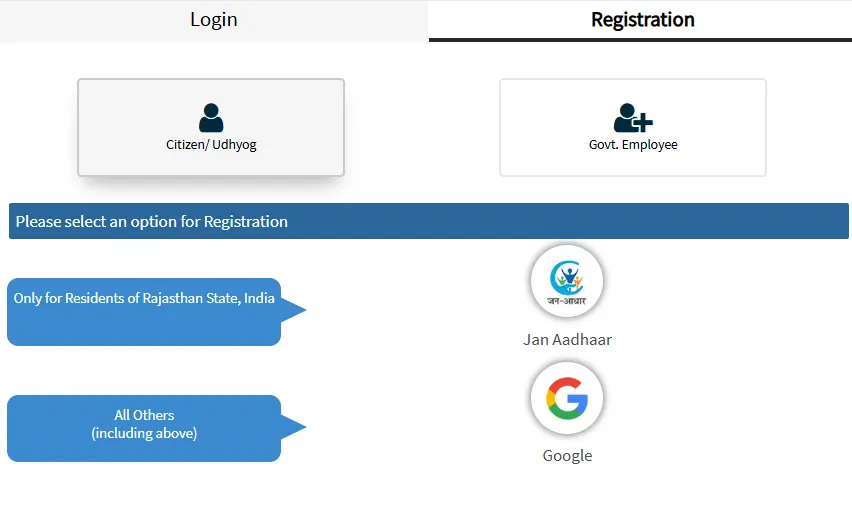
- First of all go to the official website of Rajasthan SSO Portal / SSO Rajasthan, sso.rajasthan.gov.in. Click on “Register” button on the homepage. This will take you to the registration page. Here you will get two options Citizen/Udhyog and Govt. You will see Employees, among these click on Citizen/Udhyog option.
- There are two mediums for registration on Citizen/Udhyog, Jan Aadhaar and Google, select any of these options. After filling all the required information in the selected option, an OTP (One Time Password) will be sent to your registered mobile number. Complete the verification process by entering the OTP.
- Set Username and Password: After verification, you will get the option to set a username and password. Set it up carefully and keep it in a safe place. After filling all the information correctly and completing the verification process, click on the “Register” button. Your registration will be completed successfully.
- Now you can login to Rajasthan SSO Portal using your SSO ID or username and password and avail various government services.
Rajasthan SSO ID Login Process (sso.rajasthan.gov.in Login)
You will need digital identity (SSO ID / Username and Password) to login to Rajasthan SSO (Single Sign-On) Portal. If you have this information available then login to SSO Portal by following the procedure given below-
- First of all go to the official website of Rajasthan SSO Portal sso.rajasthan.gov.in.
- Click on “Sign In” or “Login” button on the homepage. This will take you to the login page.
- On the login page, enter your username and password which you set at the time of registration.
- Fill the given captcha correctly for security.
- After filling all the information correctly, click on the “Login” button.
Now you have successfully logged in to sso.rajasthan.gov.in and can access various government services. If you have forgotten your password, you can reset the password using the “Forgot Password” option.